
Scam Protection: Google integrates local Gemini AI into Chrome browser

Google, just like Microsoft, continues its push of AI into its products. Google Chrome, the company's web browser, is getting its fair share of AI features. After announcing that AI would soon be able to take over tasks from Chrome users and that it enabled real-time protection checks for all users, Google now revealed new security protections powered by its Gemini AI that are coming to Chrome and Android.
Google announced the new functionality on its The Keyword blog. The fact that the announcement was published on Google's main blog and not a Chrome or Security blog highlights the importance of the feature. The AI is designed to protect Chrome desktop users from scams and Android users who run Chrome get new spam warnings, courtesy of the AI.
Google Chrome: desktop AI protection
Google says that it is adding the AI protection to Chrome's Enhanced Protection mode on the desktop. This Safe Browsing mode needs to be enabled by the user and has kept users "twice as safe from phishing and other scams" compared to the default standard mode according to Google.
The AI integration adds a new layer of protection to Chrome. It uses the Gemini Nano on-device large language model to provide "instant insight on risky websites" to "offer protection, even against scams that haven't been seen before" writes Google. The new feature is already being used by Google to "protect users from remote tech support scams". The company plans to expand the protection to Android and additional types of scams as well.
Chrome for Android: protection against spam messages
Google is also making use of AI to protect users better against notifications from websites that are either outright maicious or trying to scam users. The on-device machine learning model steps in if a notification from a website appears to be problematic. Google Chrome will then display a clear warning to the user with the option to look at the notification or unsubscribe from the website, so that no further notifications will be received.
Users who believe a notification is legitimate may also allow future notifications to arrive on the device to avoid Chrome stepping in all the time.
Google Messages and Phone protections
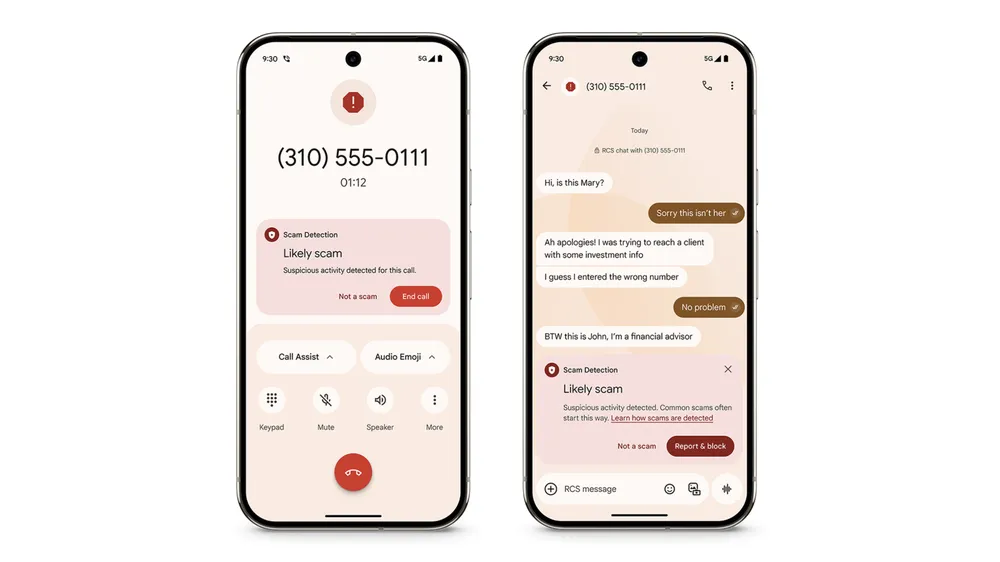
The new Scam Detection feature in Google Messages and Phone by Google is using AI to determine scam call or messages. It is powered by an on-device AI-powered feature that displays a warning to the user if a phone call or message is likely a scam. Users may then use the report & block option to deal with this and future attempts, or to allow the call or message.
Closing Words
Are we going to see an AI race between AI that is designed to secure and protect users, and AI that is designed to create sophisticated attacks to bypass these protections and lure human users into traps? Google and Microsoft continue to push AI protections into their products, and also other types of AI. But malware groups are also making use of AI.
Now You: would you allow local AI protections to run on your devices? Or won't you allow AI to run on your devices automatically under any circumstances? Feel free to leave a comment down below.











Since no one wants to use it, then force it on the public.
Gotta love google.
You are the product.
Google’s Safe Browsing is also intergrated into Firefox and can act detrimentally to the user when they try to download something that Google deems to be unsafe. All well and good, but I had to remove all of those Safe Browsing elements in about:config in order to download MSEdgeRedirect from the Github site because a message would appear onscreen to the effect that the download had been blocked by Google Safe Browsing even though I ran FF as Administrator in Windows 11 to try to get around the problem.
After removing all those so called precautions the download went ahead without mishap. So I’m loathe to allow AI to run amok on my system even though I don’t have Google’s browser installed.
Also, much to my disgust the Dutch government has contracted Google Chrome to handle all browser based interactions with the rest of the population together with Microsoft to handle all its email communications. I truly do despair.
Brave browser have also had a fishy behavior when downloading, it would some times refuse downloading and complain the downloaded file would not be safe despite having the Safe Browsing set to:
“No protection (not recommended)”
The setting is here:
brave://settings/security
I have then enabled “Override download danger level” and discovered this seems to help.
chrome://flags/#brave-override-download-danger-level
Rule of thumb. If you are getting a text message from somebody you do not know from an address/Phone number you do not know and on a topic you are not sure if it relates to you, and you respond to it and get into conversation, you will eventually get scammed 100%. These are a basic of basic cold scam texts.
There are way more sophisticated scams when the scammer takes control of the phone of a person you know and starts sending texts with links to phishing websites. Call that person back if it is a shortened/misspelled link and ask if he was the one sending the text.
You clearly don’t even use Chrome, so why do you even care and cry about this? A lot of people use Chrome, so if this works, then whatever, and if it doesn’t then it’s also whatever… It’s dumb to see people just seeing X company name and automatically jumping to cry about anything they do.
I mean, if you don’t like how the internet literally sees everything you do, anywhere you are and all that, get off the internet, isn’t that simple? oh well.
Google is only interested in protecting googles interests.
All these big corps spew the same rhetoric, “We want to protect you”, when what they actually want is to stop anyone else but them from getting ahold of your personal data so the value to them doesn’t drop.
It’s more than holding your personal information. Every tech company wants its own tech ecosystem/walled garden. Systems where they are the first and best option to buy and store digital stuff. And if somebody else wants to sell you something inside their wall garden, they take a large percentage cut on every sale. And if you leave them, you will have to leave the entire library of digital goods you accumulated until that point.
Twice as safe?
I never fell for the Nigerian letter scam, nor any scam nor phishing attempt. The more I see, the easier they are to ID. Many are dismissed without answering the phone or opening the message, the rest on a long delay connecting or message content.
Learning methods and confidently rejecting makes you safer, not having AI give you a false sense of security.