
Microsoft: 68 percent of users who sign in with passwords fail
Did you ever try to sign in to an online account or a device and it simply would not work? Sometimes, it may be just a mistyped character that is responsible for the error message. At other times, you may need to reset the password to regain access to your account.
Cyber criminals may have a better chance at signing in to some accounts than users, especially if the top 200 common passwords are used.
Microsoft revealed today that 68 percent of all password sign ins fail. In other words, only 32 percent of all Microsoft users manage to sign in when they are prompted to do so when they use passwords.
Part of the reason, according to Microsoft, is that users have to enter complex characters or one-time codes to sign in with passwords.
Passkeys offer a much better success chance, says Microsoft. Users who sign in with passkeys manage to do so successfully 98 percent of the time. The number of accounts with passkeys is rising by about 1 million passkeys per day.
Microsoft revealed the information in an article that it published on its Security blog. In "Pushing passkeys forward: Microsoft’s latest updates for simpler, safer sign-ins", Microsoft highlighted plans to get more of its users to use passkeys for sign ins.
Here are the three main changes:
- New Microsoft accounts are "passwordless by default". Microsoft says that new users have multiple options for securely signing into their accounts without passwords.
- Changes in preferred sign-in options. Microsoft plans to display the "best available method" to sign in to users. Users may also get a prompt to enroll a passkey and this will be the preferred option afterwards.
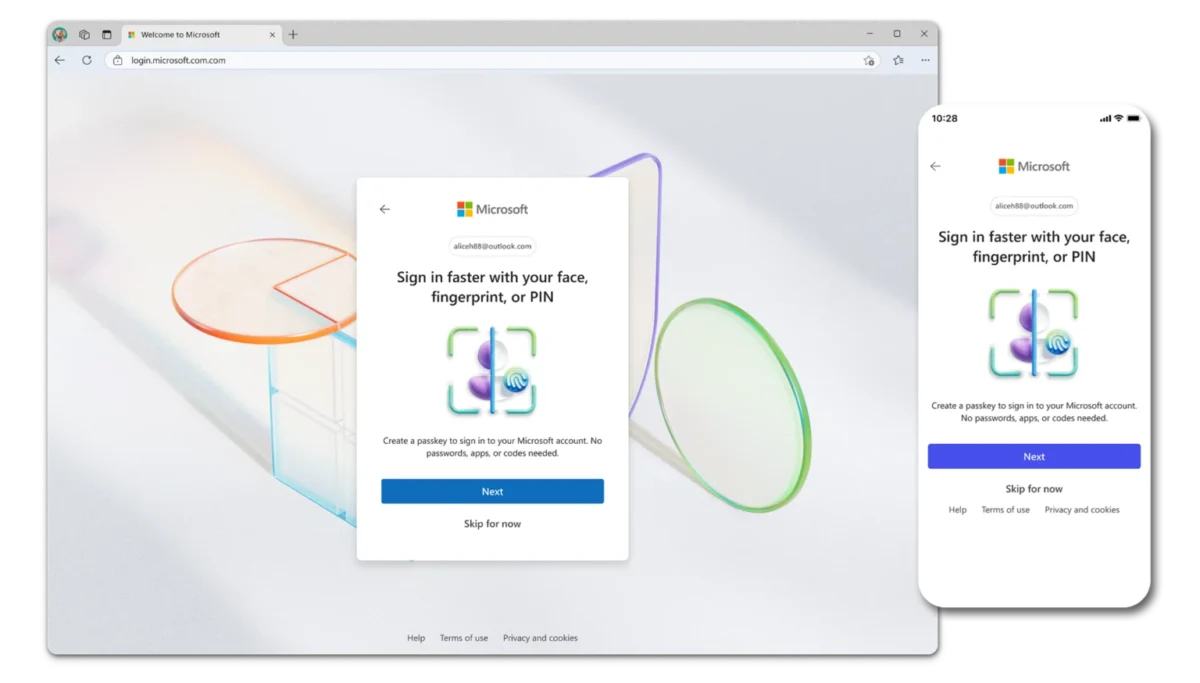
- New visual sign in experience that prioritizes passwordless methods of signing in and signing up.
Microsoft users may create a passkey on this Microsoft website. Please note that Microsoft has not yet enabled passkeys support for signing into Windows.
Passkeys issues
While passkeys promise better security, especially against password-based attacks, they suffer from a variety of issues currently. Here is a list of some of the major ones:
- Limited compatibility, not every site or application supports passkeys.
- Cross-platform use is often complicated due to vendor lock-in.
- Account recovery is often not straightforward, and may rely on traditional recovery means, e.g., via email.
- Syncing between a user's devices is not always supported, or complicated.
Now You: what is your take on passkeys? Do you use them already to secure some accounts or apps? Or do you prefer not to? Feel free to leave a comment down below.
















How can an email work as a recovery method when they lock you out of said email address?
If device is stolen or destroyed where the app is on and its bound to that device, then what?
This is a terrible solution to a real problem, and a worse problem once implemented.
I don’t use a Microsoft a/c. On both my laptops I login with a local a/c. The Microsoft Store doesn’t interest me at all so I don’t need one.
If I were to be compelled to use a passkey – I can’t imagine that ever happening – I’d acquire a Yubikey or similar. https://www.yubico.com/
OMG! Passwords are a failure!
Let’s tattoo a unique barcode to your neck and scan you like a bag of rice!
It’s for your own good, citizen. You want to be a good citizen, don’t you? Don’t you love your country?
Fuck Microsoft, a convicted monopoly. Don’t waste your time with their buggy rootkitted software.
bag of rice… they want your fingerprints and retina data.
My experience with failing passwords is that microsoft very often reports a wrong password incorrectly and in this way tries to force a reset of the password; very annoying!!
I do not understand how passkeys can be used by me and my wife on multiple devices that we sign into from multiple locations. For example, we use a common Amazon account and we may login to Amazon from our PC, our laptop, and our 2 phones from multiple locations. How does the passkey process handle such a thing? Not a problem with passwords – the single common userid and password work from anywhere.
^^ this. Exactly. Similar issue for yubikeys, authenticator apps etc.
Anyway, I also don’t have an MS a/c, just a local one.
“Please note that Microsoft has not yet enabled passkeys support for signing into Windows.”
Not true.
Isn’t it wonderful how data can be interpreted to say anything you want?
My interpretation, 68% of logon attempts are by someone trying to hack your account.
Passkeys, phooey! M$ is offerint multiple ways for you to allow them to gather more personal data.
Good interpretation.
Even if there were zero hacking, people who fail usually have multiple login attempts. Someone who knows how to use a PW manager? Just one. Or assume no hacking but 100% of users fail to login until the third attempt. There’s your 33/67% split.
The headline’s “68 percent of users” is not the same as “68 percent of login attempts,” so that should be corrected.
You’re right. When I checked the recent activity page of my Microsoft account, I saw there had been 20 sign-in attempts in the last 24 hours: 95% were unsuccessful and originated from a foreign country.
You can stop:
https://answers.microsoft.com/en-us/outlook_com/forum/all/how-can-i-stop-all-the-unauthorized-login-attempts/7addcadd-1d26-49af-9365-f6af55200201
Follow the process with care. If you get it wrong, you need to wait 24hrs to try again.
I changed mine in February and left the alias as the default.
You need to do some other changes to keep things like Outlook and OneDrive functioning properly.
Passphrases-work-for-me-2