
Microsoft Edge: AI is taking over the New Tab Page

"How can I help you today". That is what you see when you open Microsoft Edge's new tab page in the latest development version. Microsoft is replacing the traditional new tab page with a page that is all about Copilot. It is the second Copilot feature that has been added to Edge recently by Microsoft.
Currently, that is only an experiment, but there is a chance that this new AI-powered page is replacing the classic new tab page, at least as an option.
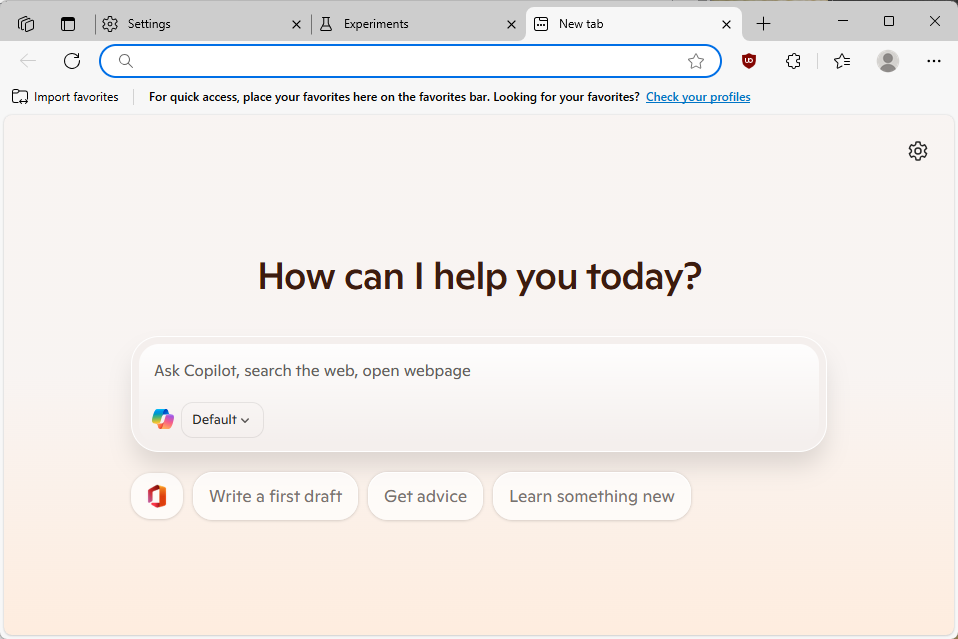
The test page displays the Copilot chat interface in the central location. You also get top sites as icons displayed underneath the interface, but that is all there is to see right now.
The default mode of Copilot combines options to chat with the AI with web-based activity, such as searching and navigating. So, if you used to type the name of a site to open it previously, this continues to work on the experimental page.
Just type the domain name, e.g., ghacks.net, and press the Enter-key to do so. Edge will load the domain and display it immediately.
Many of the interactions with Copilot redirect you to the Bing website where the results are shown. Pretty much anything that I typed was redirected to Bing. Any request to interact with the open tabs was ignored. It is possible that this is still in development and that interactions with tabs come at a later point in time.
Opera is ahead in this regard, as you can interact with the integrated AI Aria to some degree already.
How to enable or disable the new Copilot-powered New Tab Page in Edge
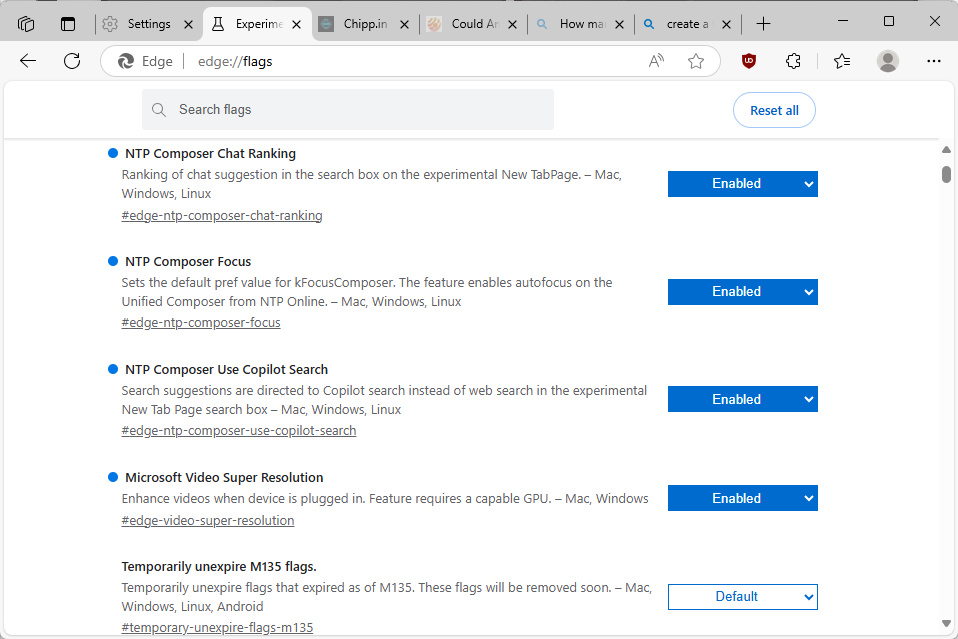
If you run Microsoft Edge 137 or later, you may configure Copilot on the new tab page in the following way:
- Load edge://flags/#edge-ntp-composer and set the status to "Enabled with experimental features"
- Load edge://flags/#edge-ntp-composer-chat-ranking and set to "Enabled".
- Load edge://flags/#edge-ntp-composer-focus and set to "Enabled.
- Load edge://flags/#edge-ntp-composer-use-copilot-search and set to "Enabled.
- Restart Microsoft Edge.
This enables Copilot on the new tab page. To disable it, set the flags either to "Default" or "Disabled". The default value may switch at some time, which means that disabled is your best bet if you do not want to use Copilot on the new tab page.
Closing Words
It remains to be seen how useful AI is going to be on the new tab page or integration in the browser. For now, the integration is rather simple and more an exact copy of what you get when you interact with AI chat tools directly.
In the future, it is likely that AI will be integrated deeper into the browser so that you can use natural language to have it execute actions for you. Opera Software has integrated some of these already in its browser, but others will likely follow.
Now You: What is your take on this? Can you see yourself using AI on the new tab page or the browser in general? Feel free to leave a comment down below. (via Deskmodder)











https://www.youtube.com/watch?v=R6GDdKrQ8EI
Microsoft lost the AI game long time ago.
https://www.ghacks.net/
@Mr. PlUC,
The only reason the US entered WWII is because the Japanese had the temerity to attack Pearl Harbour. Otherwise they would have stayed out of it.
And now your cringy little president is kissing Putin’s feet while throwing Ukraine under a bus.
The US did it so the American people would allow spending billions on developing nuclear weapons. It was a marketing strategy.
I replaced new tab with Blank Tab: https://microsoftedge.microsoft.com/addons/detail/blank-tab/ihknoknoahjhldmpdoajjdkfjhddgpcd
I use “Empty new tab page” from the chrome store.
https://chromewebstore.google.com/detail/empty-new-tab-page/dpjamkmjmigaoobjbekmfgabipmfilij
@Zasca,
I don’t notice any latency in Firefox at all. But then I have FF configured to delete cookies and cache on shutdown. Suggest you try that too.
As for Edge and Chrome, kiss your privacy goodbye is use either of those. They’re both closed source while FF is open source and can be configured to your liking.
Not the worst advices I have read, by the way.
Literally, Firefox is better than Edge for me.
Microsoft, a convicted monopoly, had to TAKE from others to make Edge. With all of their billions they couldn’t make their own browser from the ground up.
Terry Davis made his own OS, his own compiler, etc. and he was ONE PERSON! Come on, now, M$, how low can you go?
“Microsoft Edge (or simply nicknamed Edge), also known as The New Microsoft Edge or New Edge, is a proprietary cross-platform web browser created by Microsoft and based on the Chromium open-source project” – https://en.wikipedia.org/wiki/Microsoft_edge
Sad.
Meanwhile:
“US Government Already Bailing Out OpenAI/Microsoft With “Contracts”, As Usual, Back Doors You Cannot Remove Becoming ‘a Step Closer’ on New PCs (Unless Everyone Acts ASAP)”
– https://techrights.org/n/2025/04/22/US_Government_Already_Bailing_Out_OpenAI_Microsoft_With_Contrac.shtml
As Gollum said to Smeagol: “Leave now and never come back!”
As dangerous as a Christmas market on the streets of Germany.
Nobody really care about this.
Replace the new tab page with something else using extensions. No need to put up with Microsoft’s AI obsession.
Microsoft should should put more effort into improving their low quality Bing search results, than wasting large amounts of energy and money on AI. But in true Microsoft fashion, now they have two subpar products nobody wants to use.
“How can I help you today?” asked the copilot.
“By staying out of my way” answered the pilot.
That’s what I would answer should I ever have to endure such a parasite, which is unlikely given I fly Windows 7 and will switch to Linux after that… hoping the IA hysteria won’t propagate there as it does on Windows.
I very seldom have an exchange with AI chats but when I do it is by my initiative and by it only. It’s like going to the girl’s place or having her come to yours :) Wanna remain free? Option One.
France learned what victory means thanks to the Americans, just as AI will learn what intelligence means. You all should be more grateful.
Screw that garbage.
What’s next? AI replacing bookmarks?
Do not give them any ideas. This is a scary thought about replacing bookmarks.
Typical Microsoft.
I am a former user of Brave, Vivaldi and Opera, all three bad in different ways. However, I am quite satisfied with both Edge and Chrome, useful like a swiss knife. I am also satisfied with the last version of Firefox, surprisingly good despite its rough browsing (poor speed overall).